Database recovery models determine how you backup a database and the strategy you implement to meet your Recovery Point Objective (RPO). RPO enables you to measure the amount of data that might be lost in the event of failure.1
There are three recovery models in SQL Server Management Studio.
- Simple-Minimal Logging, no transaction log backups are taken. Does not disable logging as it is possible to recover to the most recent database backup only.
USE [master]
GO
ALTER DATABASE [AdventureWorks2017] SET RECOVERY SIMPLE WITH NO_WAIT
GO- Bulk Logged– It minimizes transaction log activity during bulk operations. You cannot perform point-in-time recovery by using this model.
USE [master]
GO
ALTER DATABASE [AdventureWorks2017] SET RECOVERY BULK_LOGGED WITH NO_WAIT
GO- Full Recovery– Full recovery requires you to take transaction log backups and full backups. Depending on the type of failure, you can recover either to the point of the last full backup or to the point of the last transaction log backup. If the active transaction log is still available, you might be able to recover to the most recent committed transaction. Full recovery enables point-in-time recovery.
USE [master]
GO
ALTER DATABASE [AdventureWorks2017] SET RECOVERY FULL WITH NO_WAIT
GO
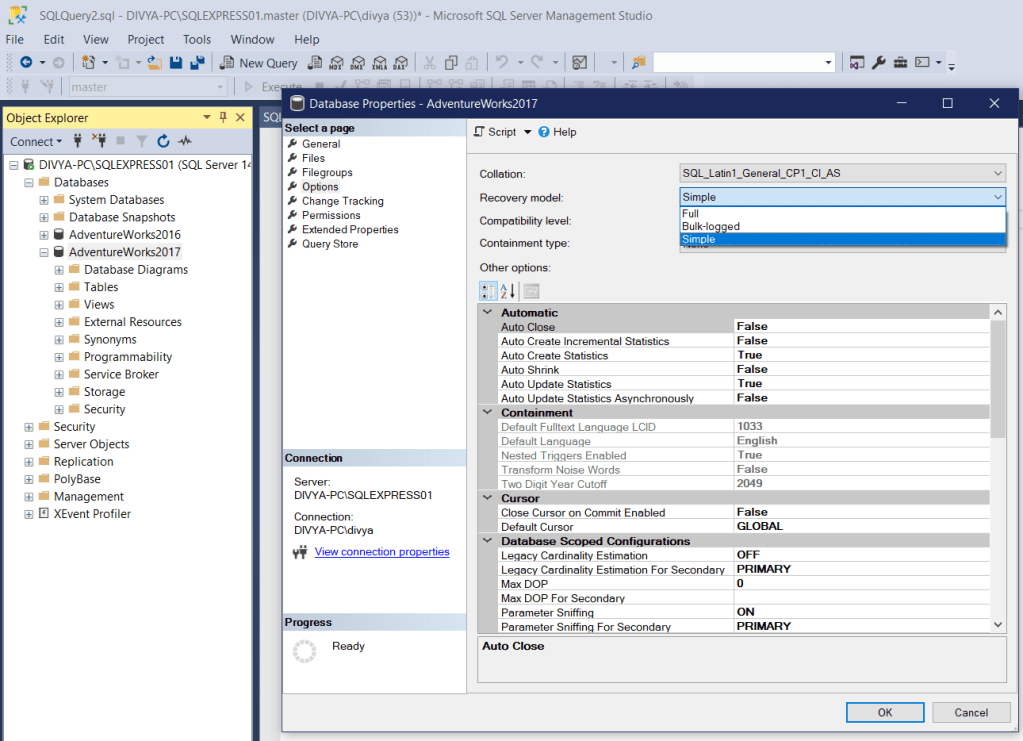
Another option is to use the SSMS, Right Click Properties -> Options->Select Recovery model from the drop down
References
1 Administering Microsoft SQL Server 2012 Databases-Orin Thomas,2012
 Database Solutions